Dynamic model
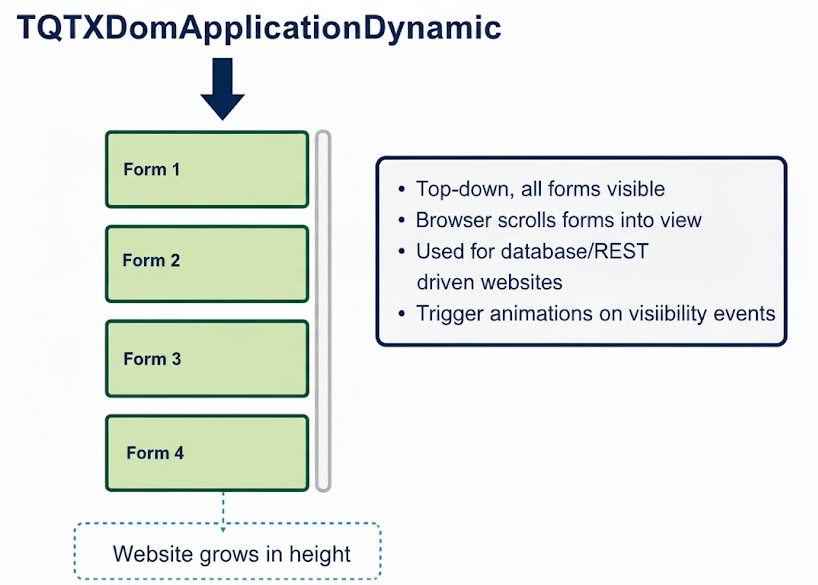
The dynamic model is meant for top-down, all forms visible, website mode. TQTXDomApplicationDynamic will create all your forms and lay them out vertically. When you call ShowForm() under this model - the browser will scroll the form into view, but the form is always visible. This mode can be used to create websites where you adapt the content based on database or REST calls. By resizing a particular form the website grows in height (or length). The standard form events triggers as a form becomes visible or goes out of view, allowing you to trigger animations.
Example of use
A documentation website that pulls help content from a REST call.
- Three forms, called "rmHeader, frmBody and frmFooter
- frmHeader acts as the website header, with a logo, a toolbar along the bottom edge for navigation, and some fancy css to make it pop
- frmMain acts as a content container. Its job is to display the content that is pulled from the server
- frmFooter is a typical company footer, with contact information, legal and copyright information
In this project a shared unit containing a controller class would be good, this way all three forms can trigger content changes without hardcoding anything.
Once content is downloaded it must be formatted to HTML, like replacing CR+LF with <br>, and lines starting with # can be wrapped in <h2> [text </h2> for headings.
Once the content is ready, assigning it to the innerHTML of frmMain, will display the html.
By disabling the overflow css so that scrollbars are hidden for the form, you can get the actual height of the content from the scrollHeight property.
You can use this height to resize frmMain so that it's displaying the full content, and is resized properly vertically.
If you dont want your forms to dynamically size beyond the browser's height, set the overflow css property to "scroll", and a scrollbar will be shown instead.